



As the Agentic world continues to expand at breakneck speed, one of the most popular areas of debate and conversation is around the security and governance of agentic identities. Whether you’re caught up in the hype of which major vendor just announced their new agentic identity provider, trying to figure out a governance strategy for agents, or thinking about how zero trust has evolved, there is a lot of avenues that could vie for your attention.
For me, the big topic on my mind is trying to dissect and understand what Agent IDs are in the context of the Microsoft ecosystem, what various components are involved, and how they differ from the traditional non-human identities (NHIs) of yesteryear. In this post I’m going to try to distill a few topics that I’ve been wrestling with when it comes to understanding agent identities in Microsoft Entra and Agent 365. This will likely be the first of several agent ID and Agent 365 posts, so strap in kids. Let’s dive in and see what we can find out.
The way things were
Back in the olden days (this was like 2 years ago which I’m told is basically ancient history today), life was simple when it came to non-human identity (NHI) in the cloud. In Entra, we had to carry around a handful of concepts in our heads:
App Registrations: The global unique configuration and representation of an Application that had been developed. This is where we stored our application’s manifest, stored secrets and certs, and initialized the scopes that an application would need.
Enterprise Apps: The good ole service principal. This was the tenant-specific instance of an App registration. Tenant Admins could apply tenant specific security configurations to these service principals and control who had access to them.
Managed Identities: Either User-assigned (could float from one workload to another, or attach to multiple) or System-assigned (tied to a single workload and kept the same lifecycle). More or less a user object that a workload could use to access other resources. No passwords or client credentials required.
That was more or less what you we worried about. If you worked in the Kubernetes space you maybe got a little more complicated with SPIFFE/SPIRE and Workload Identity Federation, but these were more advanced token issuance and token exchange mechanics and not strictly Identities, so not a topic for today.
Then we had to get all cutesy and start building out AI Agents, which we could give specific permissions and command it to go complete work on our behalf. The problem then became that we had no means to properly centralize agent identities. Agents were only identified by the source system that they belonged to, and usually not in a very meaningful way. Agents didn’t have any sort of human sponsorship or defined ownership, they had no lifecycle or governance, and auditability was kind of out the door. As I’m sure you can imagine, this starts to create some pretty serious questions about how we can properly secure and govern what agents can do and access, if we can’t identify them in the first place.
Enough history, what is Agent ID?
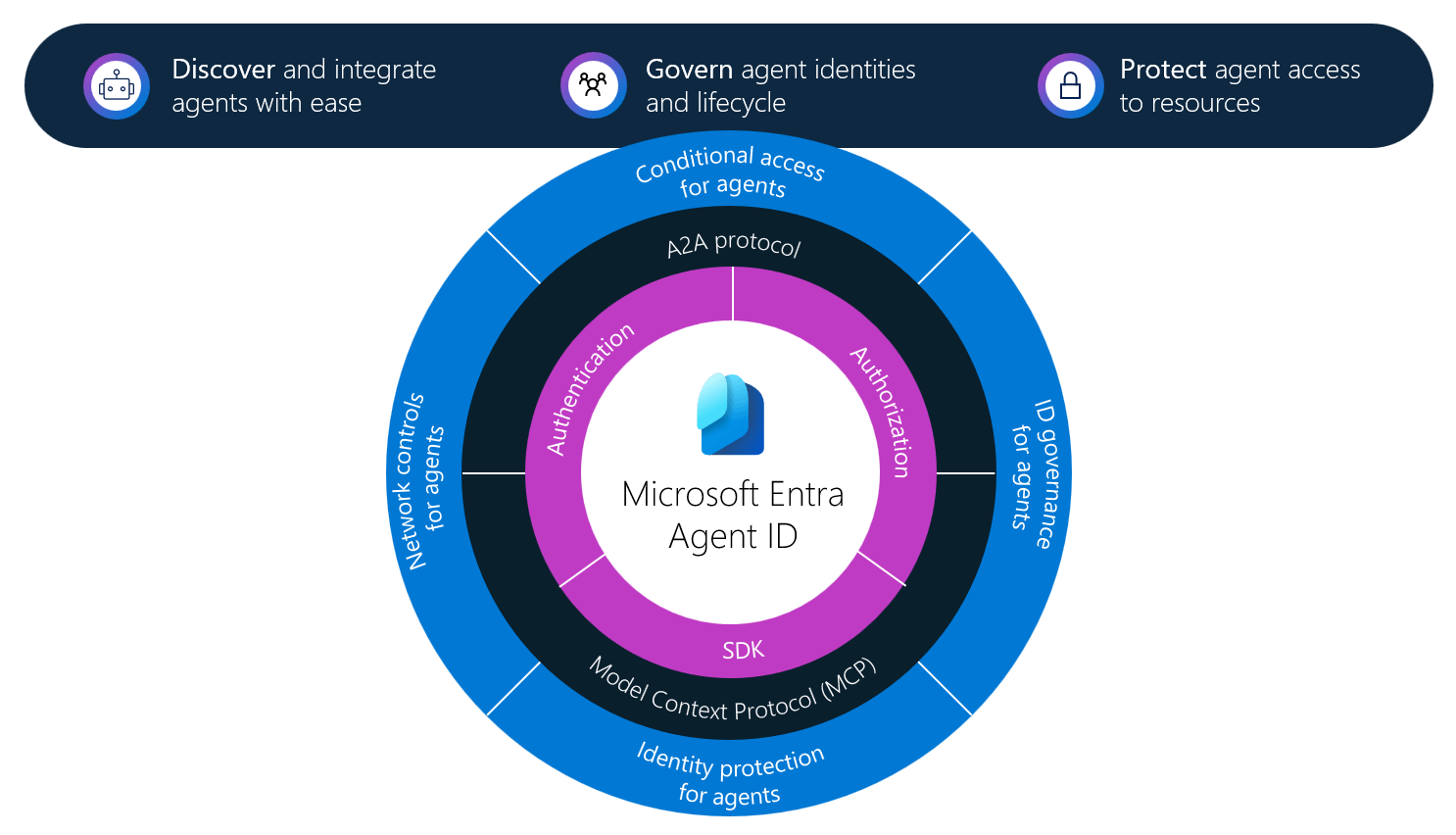
On May 1st, 2026, Microsoft Agent ID was released in general availability (GA) alongside Agent 365. The intent was straightforward: Create an identity and security framework that extends Microsoft Entra ID to AI Agents within the Microsoft cloud ecosystem. For every agent that is created within tools such as Foundry and Copilot Studio, Agent IDs are created automatically to represent those Agents. For Agents created in Non-Microsoft locations (think AWS Bedrock and Google Vertex), Agents can be reconfigured to receive Agent IDs by integrating the 3rd-party Agent with the Microsoft Entra Auth SDK.
What makes up an Agent Identity?
Agent Identities are not singular objects inside of a tenant in the same way that a User account is a singular object. Agent Identities share more similarities to App Registrations and Enterprise Apps, and yet have unique capabilities and differences that make them stand out. When we start creating Agent Identities, or have them created automatically for us, we need to understand a few key types of objects that will exist in your tenant.
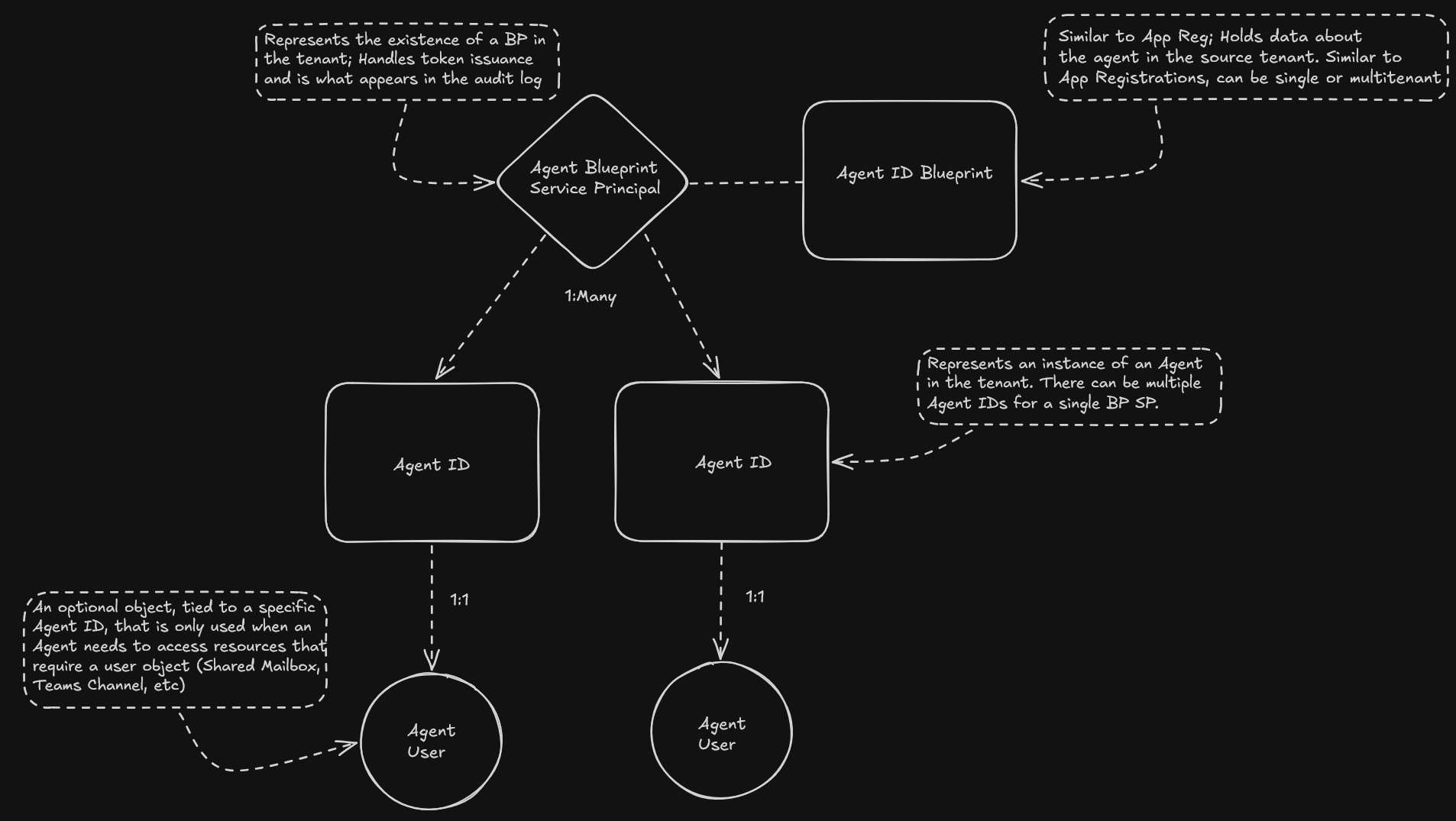
Agent ID Blueprint: Think of an Agent ID Blueprint as a traditional App Registration. The Blueprints job, whether single tenant or multitenant, is to represent the configuration of the Agent within the environment. In an Agent ID Blueprint, you’ll find familiar blades like the Manifest (the JSON representation of the blueprint) or Credentials (where you could upload certs, create secrets, or stand up federated identities). You can also see it’s permissions, sponsor info, and linked Agent IDs
Agent Blueprint Service Principal: Think of this object as similar to an Enterprise App. Where the Agent ID Blueprint is a configuration representative, the Blueprint Service Principal is the object in the tenant that handles token issuance and appears in the audit log. The existence of this object also represents that an Blueprint has been onboarded into the tenant (either created in the tenant or being consumed).
Agent ID: This object is the item that everyone is more or less familiar with. An Agent ID is an instance of the Agent Blueprint Service Principal. The blueprint service principal can represent multiple Agent IDs, and each Agent ID can have it’s own scopes and permissions separate from what it inherited from its parent blueprint. Agent IDs are what authenticate to systems, but they get their credentials/tokens issued to them from the Blueprint Service Principal.
Agent Users: These are a 4th and optional object that can pop up. These have a 1:1 relationship with Agent IDs, and are only necessary if the Agent ID has to authenticate to systems and perform functions where a user object is required. Think of an Agent accessing a shared mailbox or a Teams channel and needing a unique account to perform that function.
A few interesting things to note about these objects:
Agent IDs are (mostly) automatically created when Agents are built in Foundry, Copilot Studio, and Teams. Agents built in 3rd party platforms require code from the Entra Auth SDK.
Interactive Agents rely on OAuth 2.0 On-behalf-of Flow, so the permissions of the user interacting with the Agent typically dictate what the Agent can do. Autonomous Agents will use the Client Credential flow, and can have their own permissions separate from the User prompting the agent.
Policies that are applied to Agent Blueprints impact all associated Agent IDs within the tenant. So if you create a conditional access policy against an Agent Blueprint, all related Agent IDs must adhere to the same CA policy.
Agent ID Governance primarily comes down to two roles: the sponsor and the owner. The should not be confused with the Agent Registry Owner, which is a separate and unique role (more on this later).
Agent 365 is intended to act as the centralized control plane for managing Agents and Agent IDs within your tenant, although you can manage blueprints and IDs within the Entra portal.
Deleting a Blueprint Service Principal also offboards the Blueprint from the tenant.
Conclusion
The Agent Identity conversation is still early and new, and is bound to evolve greatly as some of the initial hype wave and land grab settles down. That said, it isn’t going away. Microsoft is making large investments in providing organizations with the tools they need to identify, govern, and secure AI Agents across both first and third party ecosystems. This will continue to help organizations pull get a handle on their agentic workloads.
Next up: We are going to dive a little deeper into how Agent IDs get governed within Entra Identity Governance and Agent 365. Stay tuned!